WooCommerce + Xero integration

WooCommerce to Xero, one invoice per order, VAT coded

Real-time, per-order sync from WooCommerce to Xero. UK VAT correct. No summaries. No gaps. No manual entry.

  • Every order in Xero in seconds, automatically
  • Right VAT codes, contacts and accounts, set once
  • Stock levels from Xero, hourly, matched by SKU
Free plan, no time limit. No card required. 14-day free trial on paid plans.
Works with

  • WooCommerce
  • Xero
  • WordPress.org
WOOCOMMERCE
#1024
CustomerSarah Mitchell
Blue Ceramic Vase£68.00
Woven Table Runner ×2£36.00
UK Shipping£14.33
VAT 20%£23.67
Paid£142.00
XERO
INV-1024
ContactSarah Mitchell
Sales4000 · £104.00
Shipping4200 · £14.33
Tax20% VAT on Income
Due£0.00
✓ Synced in seconds ✓ Contact matched ✓ VAT coded ✓ Payment recorded
Why Syncible

Your bookkeeper will notice the difference immediately

Built specifically for UK WooCommerce merchants, not a generic connector that needs configuring every other week.

WOOCOMMERCE
Order #1024
23 Jan 2025 · your-store.com · Sarah Mitchell
ItemPrice
Blue Ceramic Vase ×1£68.00
Woven Table Runner ×2£36.00
UK Shipping£14.33
Subtotal (ex. VAT)£118.33
VAT 20%£23.67
Total£142.00
Seconds
XERO
Invoice INV-1024
23 Jan 2025 · Due 06 Feb 2025 · Sarah Mitchell ✓ Matched
Description · AcctAmount
Blue Ceramic Vase · 4000£68.00
Woven Table Runner ×2 · 4000£36.00
UK Shipping · 4200£14.33
VAT · OUTPUT2£23.67
Total£142.00
Payment recorded · £142.00
  1. Matched to your existing Xero contacts by email. New customers are auto-created.
  2. VAT code applied automatically from your store settings. OUTPUT2, EXEMPT or Inclusive detected without any config.
  3. Invoice marked paid in Xero the moment WooCommerce confirms the transaction. No manual reconciliation.
How it works

Up and running in minutes

No developer, no CSV mapping, no complicated setup. If you can click, you can set up Syncible.

1

Install the free plugin from WordPress.org

Install Syncible from WordPress.org and activate it, then connect WooCommerce with one click.

your-store.com/wp-admin
Syncible installed successfully
Your store is now connected
  • Plugin activated from WordPress.org
  • WooCommerce connected
  • Order sync activated
  • Refund sync activated
2

Connect your Xero account

Click Connect Xero and log in. Choose your organisation, that’s it. No extra Xero subscription or add-on required.

login.xero.com
Xero connected
Demo Company (UK)
  • Organisation authenticated
  • Token stored securely (AES-256 encrypted)
  • Chart of accounts loaded
  • Ready to post invoices
3

Set your preferences once

Tell us your sales account code and VAT rate. Syncible maps everything from there. Set once. We check it before every export.

Syncible · Settings
Sync preferences
Sales account4000 — Sales
Shipping account4200 — Shipping
VAT codeOUTPUT2
Invoice prefixINV-
✓ Preferences saved, sync is now active
4

Sell, we handle the rest

Every order flows to Xero in real time. Your dashboard shows every sync, every invoice, every error, so you’re always in control.

Syncible · Dashboard
14Orders today
£5,247Revenue synced
0Errors
OrderCustomerTotalXero
#1031Emma Clarke£142.00
#1030James Liu£89.50
#1029Sarah Mitchell£234.00
#1028Michael Brown£67.00
★★★★★
Great App – Saves hours
“Great app that saves us hours of time. Being able to choose which Xero accounts to map transactions to makes the whole process much easier. Highly recommended.”
wilbradshaw, five-star review on WordPress.org · Read the review
Your dashboard

Everything in one place

Monitor every sync, catch issues instantly, and keep your books perfectly aligned.

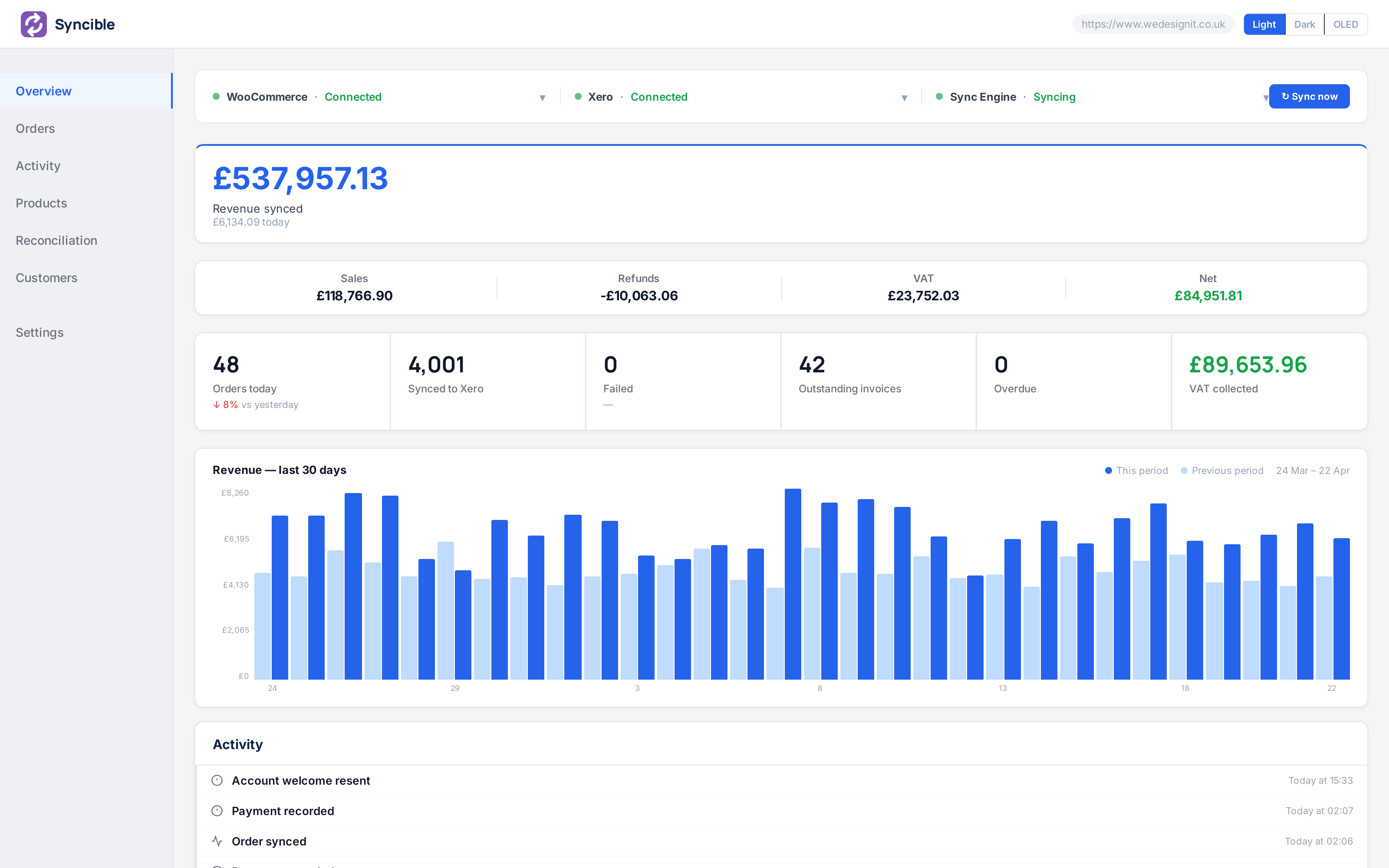
Syncible dashboard: Overview

Overview

Today’s orders, what reached Xero, and anything that needs you.

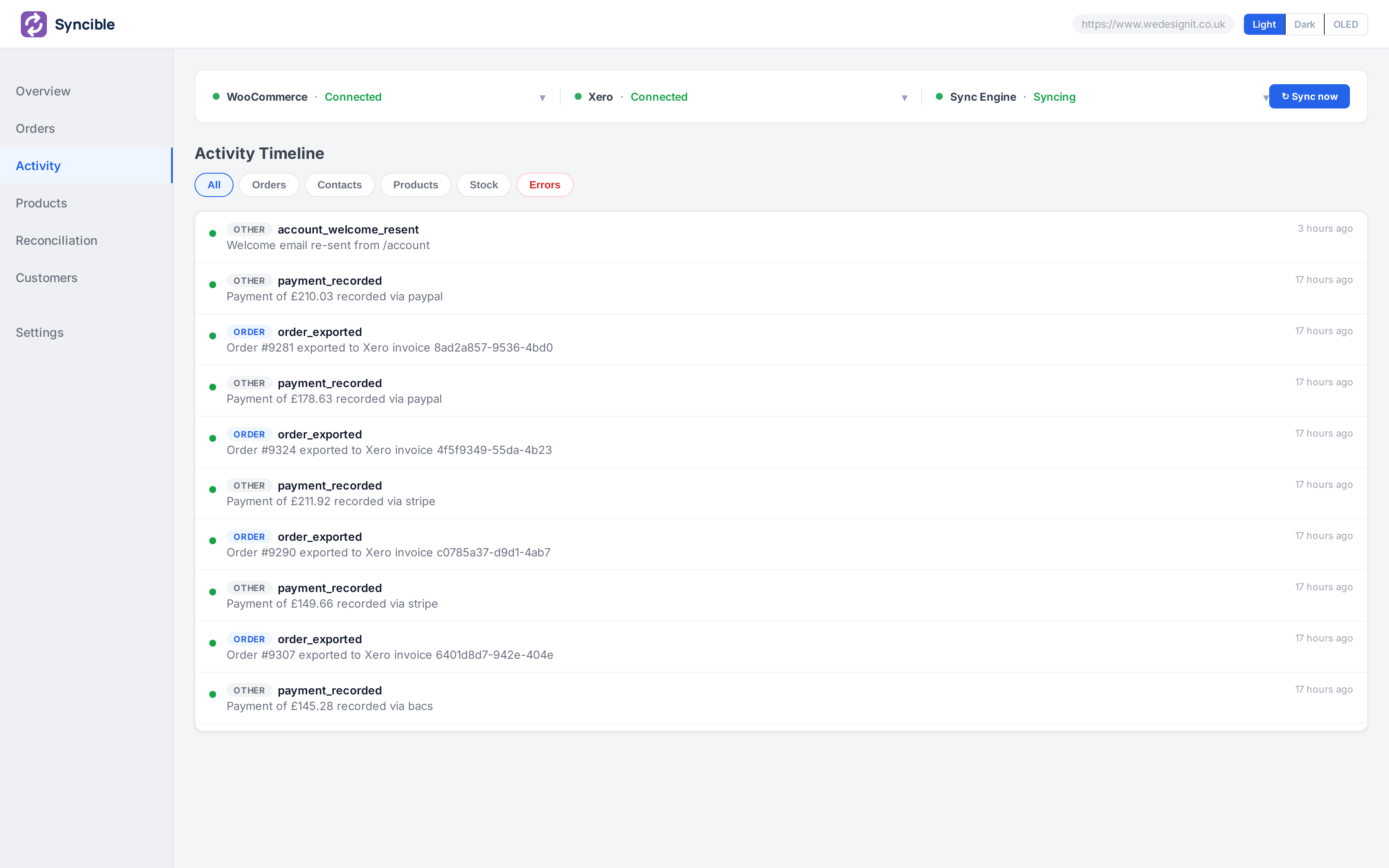
Syncible dashboard: Activity feed

Activity feed

Every sync shows as it happens: order sent, invoice created, credit note raised.

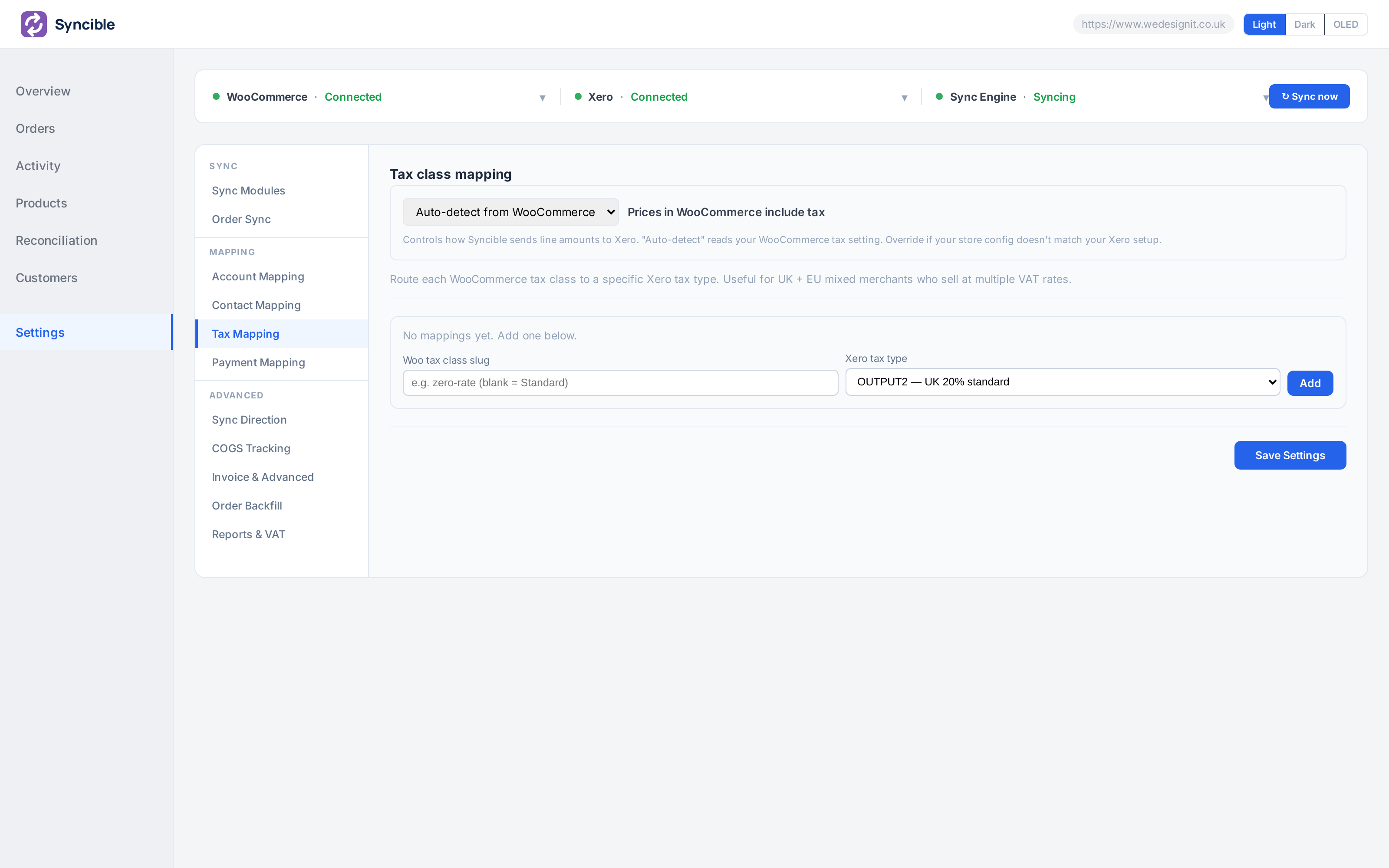
Syncible dashboard: Settings, tax mapping

Tax mapping

Each WooCommerce tax class mapped to a specific Xero tax type, set once.

How we compare

Why merchants are switching to Syncible

We’re not the only option, but we think we’re the most complete one for UK WooCommerce merchants who run Xero.

FeatureSynciblesyncible.co.ukMyWorksmyworks.softwareLink My Bookslinkmybooks.com
Sync engine
Real-time syncWebhook-driven, per individual orderWebhook, in secondsInterval: 5, 10, 30 or 60 minPer payout
Orders to Xero invoicesOne Xero invoice per WooCommerce order✓✓Summary journals per payout
Refunds to credit notesAutomatic, linked to the original invoice✓✓Included in the payout summary
Cancellations void the invoiceXero invoice voided when the order is cancelled✓Not documentedNot documented
Accounting depth
COGS trackingA cost bill posted to Xero for every order with a cost price✓ Growth planNot documentedPer settlement period
Per-contact account mappingB2B: route specific companies to their own Xero account code✓ Pro planNot documentedNot documented
Payment gateway to bank accountStripe, PayPal, COD each post to a different Xero bank account✓ Per gateway✓ Gateway mapping✓ Per payment processor
Per tax-class VAT mappingUK 20%, zero-rated, exempt, routed per line✓ Per classPer-region tax mappingNot documented
Onboarding & recovery
Historical order backfillBulk-sync past orders when first connecting✓ Starter plan✓ Push/Pull bulk sync90 days of history in the trial
Sync audit log and one-click retryEvery action logged, with a Retry button on failed exports✓Not documentedNot documented
Failure email alertsYou get an email when an order fails✓ Email alert on failureNot documentedNot documented
Platform & pricing
Free planNo card required, suitable for small stores✓ 100 orders a monthLaunch tier, 20 orders a month14-day free trial, no free plan
Starting priceMonthly cost for a connected storeFree, then from £29/moFrom $19/mo (Rise, 60 orders)Priced by orders and channels

“Not documented” means we found no public source on 10 September 2026, not that the feature is missing. Link My Books uses a payout-summary model rather than per-order invoices, a different approach by design.

Pricing

Stop paying yourself to do admin.

The average UK WooCommerce merchant spends hours each month manually reconciling orders into Xero. At your hourly rate, that’s real money leaving the business, every single month. Syncible makes it disappear from day one.

  • Flat rate, no per-order fees, no surprise overage charges
  • Real-time sync, every order in seconds
  • Up and running in minutes, no developer needed
  • 14-day free trial, cancel before day 14, pay nothing
Find your plan and your time cost
Orders per month500 orders
Minutes spent per order (currently)5 min
Your time is worth
£ per hour
41.7Hours saved / month
£1,875Value reclaimed / month
Syncible pays for itself 31× every month
Start saving 41.7 hrs free for 14 days →
Free
WooCommerce + Xero, to try it or for a small store
Up to 100 orders a month
  • Real-time order sync
  • Refunds as credit notes
  • Payments recorded
  • Customer matching
  • Account and tax mapping
  • Sync issues panel
  • Email setup help
£0/mo
Install free
Starter
For growing stores
Up to 500 orders a month
  • Everything in Free
  • Stock sync
  • Payment gateway routing
  • Historical order backfill
£29/mo
Start 14-day trial
Pro
For accountants and complex B2B setups
Up to 5,000 orders a month
  • Everything in Growth
  • Per-contact account mapping
  • Live invoice verification
  • Reconciliation reports by period
  • Smart auto-retry over 7 days
  • Priority support
£99/mo
Start 14-day trial
Enterprise
For agencies and high-volume merchants
No monthly order limit
  • Everything in Pro
  • Dedicated onboarding
  • Agreed response times
  • Phone support
£299/mo
Talk to us

QuickBooks Online is coming soon. Join the waitlist →

Free plan via WordPress.org  ·  Monthly order allowance on every plan  ·  14-day trial on paid plans  ·  Cancel anytime

Rob Gibbard, founder of Syncible
Who builds it

I run We Design It, a small web development agency in Bournemouth that has built and hosted WooCommerce stores since 2015. For eleven years I built the integration between shop and accounts for clients one at a time. Syncible is that work done once, properly, as something you install yourself.

Rob GibbardFounder, We Design It Ltd, Bournemouth
The full story, and the studio, on the homepage →
Frequently asked

Common WooCommerce + Xero questions

More questions? View the full FAQ →

Does it work with WooCommerce Subscriptions?

Yes. Renewal orders flow through the same per-order sync pipeline as one-off orders, so each renewal becomes an individual Xero invoice with the full line-item breakdown and customer detail.

What happens if Xero goes offline?

Syncible queues orders and retries automatically with exponential backoff. Orders aren't lost — once Xero is reachable again the backlog drains in order, and any failures are surfaced in your dashboard with a one-click retry.

How does VAT work?

UK VAT is handled per line. Tax classes from WooCommerce (standard 20%, zero-rated, EU exempt, reverse-charge) are mapped to the corresponding Xero tax codes on each invoice line, so your VAT return reconciles correctly without manual adjustments.

Will it create duplicate invoices?

No. Every WooCommerce order is matched by ID before it's posted to Xero. If an order has already been synced it's skipped; if it's been updated, the existing Xero invoice is updated instead of creating a new one.

Can I backfill historical orders?

Yes. The dashboard includes a date-range backfill tool that pulls historical WooCommerce orders and posts them into Xero in chronological order, respecting your Xero rate limits so nothing gets throttled or dropped.

Your books should run themselves.

Set up in minutes, see your first invoice in Xero before your next coffee.

Free plan via our official WordPress.org plugin. WooCommerce + Xero. Up to 100 orders a month. No card, no time limit. Orders above the limit wait and are sent when you upgrade, or on the 1st. Nothing is lost.

14-day free trial on paid plans  ·  Cancel before day 14, pay nothing  ·  Set up in minutes

Not ready yet? Email me the setup guide

One email with the guide, then two more over ten days on tax codes and whether it is worth it. Reply "no thanks" and that is the end of it.

More on this integration